
Coupons
Discount codes with limits, requirements and multi-month durations, for giveaways, targeting and win-backs.
A coupon is a code a customer enters at checkout. Unlike a sale it is not automatic and not visible on the storefront, which makes it useful for giveaways, targeted offers and community rewards.
Dashboard → Marketing → Coupons. Needs coupon_read.
Creating a coupon
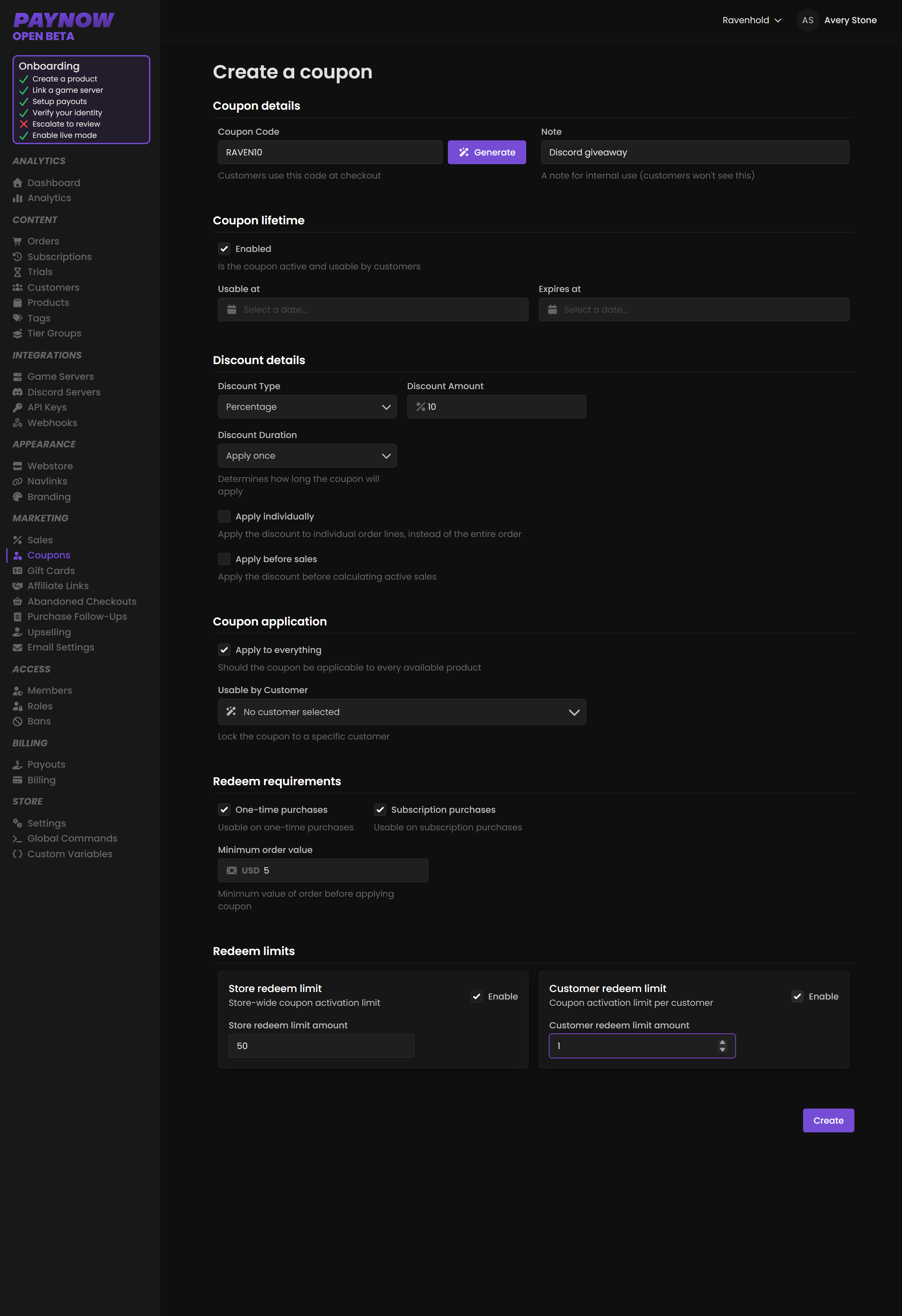
Click Create. Six sections.
Coupon Details
Enter a code, or click Generate for a random one. Give it a name for your own reference; customers never see the name, only the code. Use memorable codes for public campaigns (RAVEN10) and generated codes for giveaways, where guessability is the risk.
Coupon Lifetime
Optional but recommended. Tick enabled and set the valid date range.
Discount Details
Choose Percentage or Fixed, and the value. Then set how long the discount applies to purchased packages:
| Duration | Effect |
|---|---|
| Apply once | Discounts a single payment. |
| Forever | Discounts every renewal, indefinitely. |
| Multiple subscription renewals | Discounts a set number of subscription renewals, for example 6. |
On an old coupon the third option reads Multiple months and counts months instead of renewals. That's a deprecated field kept for coupons that already used it; new coupons always count renewals.
Forever and Multiple subscription renewals only apply to subscription products. They have no effect on one-time purchases.
Forever means forever. A Forever coupon on a monthly subscription discounts every renewal for as long as that customer stays subscribed. Issued carelessly, or leaked, it permanently reduces your recurring revenue with no expiry. Use Multiple Subscription Renewals for retention offers and reserve Forever for deliberate cases such as founding supporters or partners.
Two more options. Apply Individually applies the coupon to each product in the order rather than the order total. Apply before sales calculates the coupon discount before any active sale, which changes the final price. Test with a real cart before publishing a code during a sale.
Coupon Application
Limit to specific products or tags, and optionally bind it to a specific customer so nobody else can use it. Leaving these empty applies the coupon to all products, usable by anyone with the code.
Bind giveaway prizes to the winner, which makes the code worthless if shared. If they have never logged into your store, create them first.
Redeem Requirements
Whether the coupon works on one-time purchases, subscriptions or both, and a minimum order value.
Redeem Limits
A total usage limit across the store, a per-user limit, or both.
Always set limits on a public code. With no total cap and no per-user cap, a code posted publicly can be used indefinitely by everyone who finds it, and game store codes spread to deal sites quickly. A store-wide limit of 50 with a per-user limit of 1 is a sane default for a community giveaway.
Once created, the coupon's page lists every order it was applied to.
What coupons are good for
Giveaways, where a code costs you margin rather than cash. Win-backs, with a Multiple Subscription Renewals coupon aimed at lapsed subscribers. Partners and creators, each with their own bound, tracked code. And apologies after downtime, where a code repairs goodwill more cheaply than refunds.