
Bulk Assigning Products
Grant a product to many customers at once, for compensation, giveaways, or migrating existing perks.
Bulk Assign puts a product into many customers' inventories at once, without anyone paying for it: compensation after an outage, a giveaway, or perks people already own after a migration. To hand out value rather than a specific product, use gift cards instead.
Dashboard → Content → Products → Bulk Assign. Needs product_read.
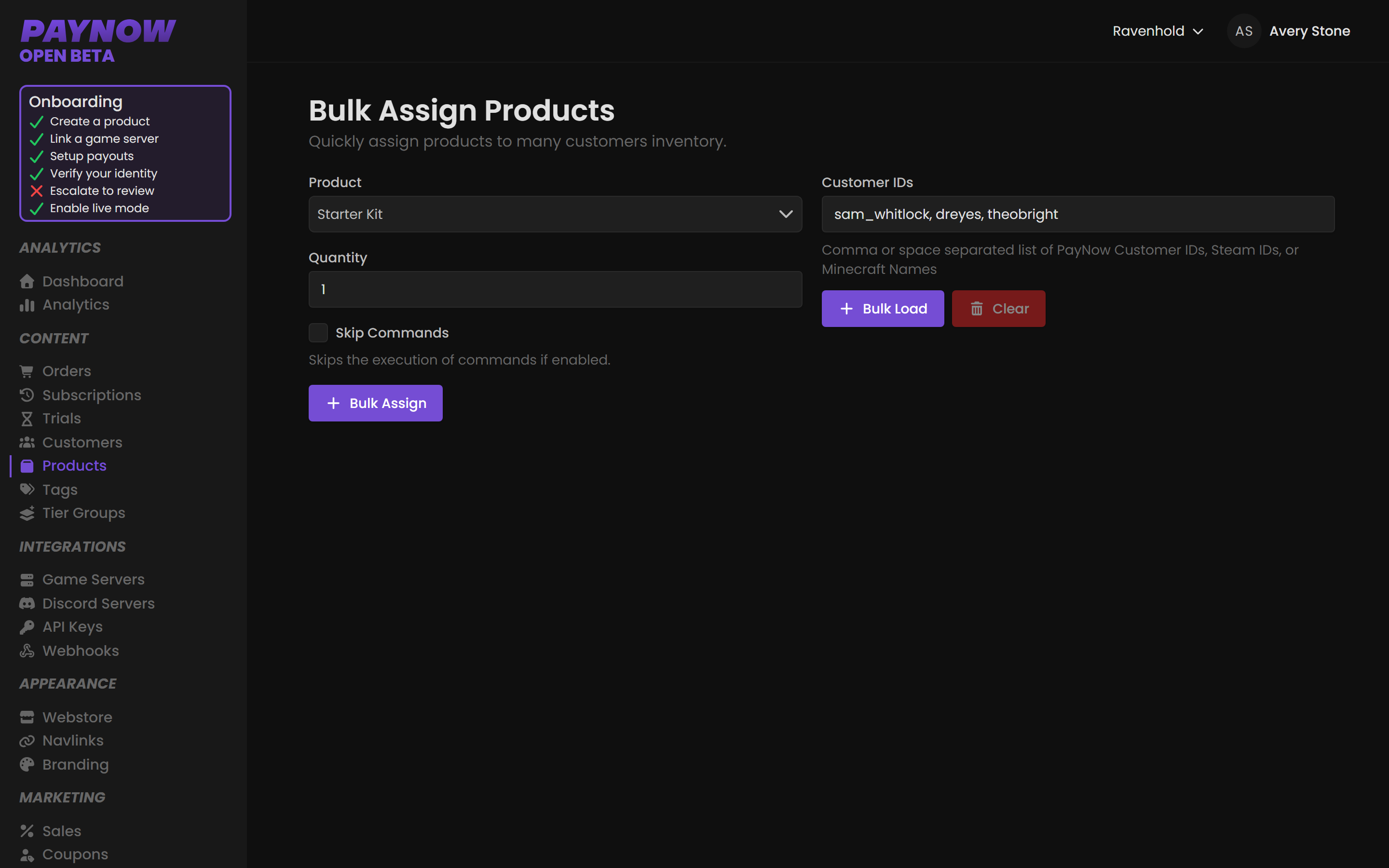
Assigning a product
- Go to Content → Products → Bulk Assign.
- Choose the Product.
- Set the Quantity each customer should receive. Defaults to
1. - Decide whether to tick Skip Commands.
- Enter your Customer IDs.
- Click Bulk Assign.
The four fields
| Field | What it does |
|---|---|
| Product | The product to grant. One product per run. |
| Quantity | How many each listed customer receives. Applies to everyone in the list; you cannot vary it per person in a single run. |
| Skip Commands | When ticked, the product lands in the customer's inventory but its commands do not execute. |
| Customer IDs | Who receives it. Comma- or space-separated. Accepts PayNow Customer IDs, Steam IDs, or Minecraft names, and you can mix formats in one list. |
Use Bulk Load to paste a large list of identifiers in one go, and Clear to empty the list. Individual customers and their inventories are covered in Managing Customers.
Deciding on Skip Commands
By default, commands run. Assigning a rank to 500 people executes the rank command 500 times.
| Tick Skip Commands when… | Leave it unticked when… |
|---|---|
| Players already have the perk in-game and you are only correcting their PayNow inventory | You want the perk actually applied in-game |
| The command is destructive or non-idempotent (resets balances, overwrites inventory) | The command is safe to run |
| Your server is offline and you do not want a queue of commands firing on boot | The server is up and you want immediate delivery |
Test on yourself first. Run a bulk assign with a single customer ID, your own, before running it against a real list. There is no bulk un-assign, and a command that behaves badly at scale is very hard to undo.
Pay particular attention to commands that set rather than add. setbalance 5000 run on 500 players will overwrite balances people earned or paid for.
Leave commands on for downtime compensation, giveaway prizes, staff perks and crowdfunding rewards. The exception is a post-migration perk restore, where players kept their in-game rank but PayNow has no record: tick Skip Commands, because the perk already exists in game.
Before you run a large batch
Check the identifier format. Minecraft names change; Steam IDs and PayNow Customer IDs don't, so prefer stable identifiers for a list assembled weeks ago. Confirm the quantity, which applies to everyone in the list, and confirm the product, because there's no undo. If commands will run, check your server is up.